Find active processes and DLLs in your system

Process Explorer lists every running application on your PC, as well as information about running processes and open files.

Top Recommended Alternative

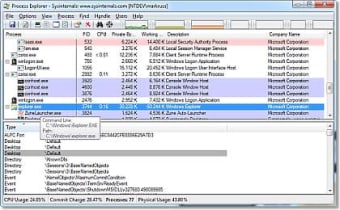
In Process Explorer, the list is shown in a tree structure, and everything is displayed in a two-panel window. The upper panel lists current applications, while the bottom panel gives you access to detailed information on the process you select. You have the option to stop individual applications, change the priority of the process that are currently running, and view the properties of each process. The properties show how much memory and space each process is taking up.

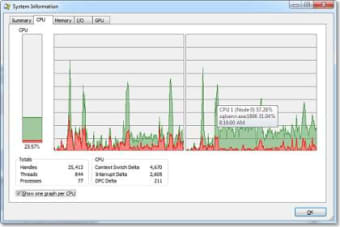
You can also discover specific information about your system using Process Explorer. This includes a summary of what your system is currently doing, as well as statistics and graphs on your PC's CPU, memory, input, and output.

Since Process Explorer lists all DLL (Dynamic Link Library) files in your system, it is also a useful tool when it comes to trying to locate errors specific to those functions. You can even filter your results to show only DLLs and memory-mapped files.

The help file unfortunately does not work in Process Explorer, making it difficult to learn to use the program if you encounter difficulties or have questions.

Process Explorer is a good way to see what's running on your PC, if you don't need guidance via the help file.


  • Pros

    • Runs quickly
    • Option to refresh
    • Option to change opacity
  • Cons

    • Help file does not open
 0/2

App specs

Also available in other platforms

Program available in other languages


User reviews about Process Explorer

3.9

2 reviews

Add review

Main reviews for you

  • Anonymous user

    Just perfect tool if in good hands. That is a perfect tool, if you ve'got enough patience and you are a bit clever you can even clean yoyr pc from viruses, and other unwanted stuff.etc,etc.,etc.

  • Anonymous user

    A Good Free Task Manager Replacement. Process Explorer is a good free basic task manager replacement. It doesn't have all the features some of the other task manager alternatives have but it has the basic features most need. It also doesn't need to be installed to replace the task manager like the others do. The only complaints I have with Process Explorer is it doesn't show you which processes are safe and which aren't. It also doesn't do as good of a job at killing processes that some of the other alternatives do.Process Explorer is best for those who want a basic task manager replacement without wanting to install another piece of software on their computers. For those who are looking for more features like knowing if a process is safe or not and a better way to kill processes would be better to use another task manager like Auslogics Task Manager. Pros: No Installation RequiredSimple And Easy To UseFree Cons: Too Basic For Some PeopleNot Very Good At Killing ProcessesNo Way To Tell If A Process Is Safe Or Not

More

You may also like

Alternatives to Process Explorer

Explore Apps

Latest articles

Laws concerning the use of this software vary from country to country. We do not encourage or condone the use of this program if it is in violation of these laws.
Softonic

Is Process Explorer safe?

98/100

Score result: Clean

This file passed a comprehensive security scan using VirusTotal technology. It is safe to download.

  • Virus free
  • Spyware free
  • Malware free
  • Verified by Security Partners

    VirusTotal logo

Scan Info

Last scan
Friday, February 20, 2026
Scan provider
VirusTotal · Full report

File Integrity

File
17.09.zip
SHA256
b335da33330a7bc3a888ed04cc505daa95cfaef911563d9d5033e1e3dfd4150e
SHA1
c93ae0e86c6277d6cae1ca804fb12531fd0e3f2a

Softonic security commitment

Process Explorer has been thoroughly scanned by our advanced security systems and verified by industry-leading partners. This file comes from the official developer and has passed all our security checks, showing no signs of viruses, malware, or spyware. For more information, visit our Security and Trust Center